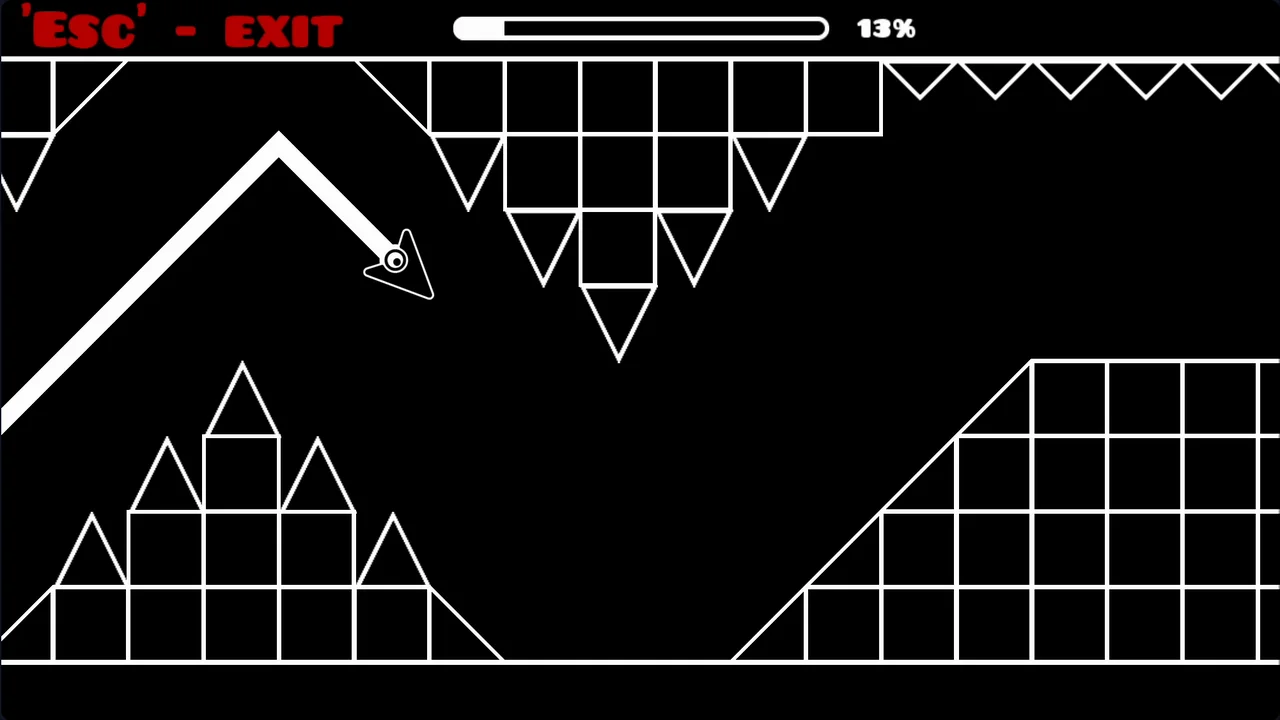
One button. One 45-degree flight path. Zero room for error. Geometry Arrow takes the legendary Wave mode from Geometry Dash and strips it down to its purest form — a minimalist, black-and-white reflex game that feels like a pared-back cousin of Space Waves, deceptively easy to pick up and brutally hard to master.
Game Overview

The entire game runs on a single input: hold to climb diagonally along a fixed 45-degree line, release to dive along the same fixed angle. There's no curve to feather and no partial input — you're always tracing one of two straight diagonal lines, which is what makes the timing feel so precise once it clicks. True to its minimalist look, Geometry Arrow skips power-ups, health bars, and even a practice mode — it's just you, the wall of hazards, and an instant restart the moment you clip anything.

The 13-level campaign is organized into 6 difficulty tiers of two levels each, and the very last level only unlocks once you've cleared everything before it.
The opening level is deliberately forgiving — a slower pace and wide gaps to let you get a feel for the hold-and-release rhythm — before later tiers ramp up speed, shrink the passable space, and stretch the levels out.
Control & How to Play
The arrow always moves forward automatically; you only steer the climb and dive.
Desktop
- Hold Left Mouse Button or Spacebar → climb diagonally upward
- Release → dive diagonally downward
Mobile / Tablet
- Touch and hold the screen → climb diagonally upward
- Release the screen → dive diagonally downward
One collision with a wall, spike, or hazard ends the run instantly — reach the glowing portal to clear the level.
What Makes Geometry Arrow Fun
There's no practice mode, and that's a bigger deal than it sounds. You can't scout a level's layout ahead of time, so every fresh stage becomes a genuine first-contact reflex test rather than a memorization exercise you've already previewed. By the later tiers, that lack of a preview really shows its teeth.

Once you've died a few times, though, the fixed layouts flip in your favor — every obstacle pattern is identical run after run, so progress comes purely from muscle memory and pattern recognition rather than luck. Add in instant, loading-free restarts and a live 0–100% progress bar, and every failed attempt turns into a personal record chasing itself.
Tips & Strategy
- Read the shape of the path before you move. If the upcoming section is close to a straight line, use quick, short taps (a "zigzag" rhythm) instead of long holds to keep a stable, low-amplitude line.

- If it's a clear wave shape, match its rhythm — press and release in sync with the curve rather than tapping rapidly.
- Stuck on a hard level? Drop down to an easier one for a bit. Repeated failures build tension that slows your reactions and causes more mistakes — a quick reset on a lower difficulty helps you come back sharper.
- Keep your focus 2–3 obstacles ahead rather than staring at the arrow itself, so your brain has time to process the next move.
- After a crash, check your glowing trail — it shows whether you overcorrected or dropped too early.
- Stay low before an upcoming ceiling spike so you have maximum room to climb.
- The pacing often lines up with the background music; letting the tempo guide your click frequency helps more than watching the screen alone.
- Most crashes happen right before the portal from panic-clicking — keep your inputs steady once you're past 90%.
Difficulty Tiers & Level Progression
Geometry Arrow's difficulty system is easy to read at a glance: the level-select screen is the only place in the entire game with color, and each color is a mood. Working from easiest to hardest, the emoji faces run from a calm blue sunglasses smile, to a flat green neutral face, then yellow, orange, and an angry purple, before topping out at a dizzy red face with x'd-out eyes and a wavy mouth. Each tier holds two levels, and the escalation is consistent — faster forward speed, narrower gaps, and longer stages — until the 13th and final level, which stays locked until every tier before it is cleared.
Player Reception
Geometry Arrow has built a solid following across web-game portals. On Y8, it's logged well over 11 million plays with a strong player rating near 8/10. Playgama users rate it close to 4.7 out of 5 from thousands of votes, 1001Games shows a similarly strong 4.1 out of 5 across more than 100,000 plays, and Snokido reports roughly 85% positive sessions from over 200,000 players — consistent numbers that point to a game people keep coming back to despite (or because of) its difficulty.
Similar Games You May Enjoy
If the wave-flight reflex challenge of Geometry Arrow is your thing, these are worth a look:
- Geometry Dash — the original rhythm platformer that popularized the Wave mode, with custom soundtracks and a huge community level editor.
- Space Waves — a close relative in spirit to Geometry Arrow, with neon obstacle courses and selectable difficulty tiers.
- Wave Dash: Geometry Arrow — another precision wave game built around beat-synced levels and high-speed corridors.
- Geometry Vibes — wave-style navigation with customizable skins and multiple game modes.
- Tunnel Rush — a different flavor of reflex test, sending you through spinning 3D geometric tubes instead of a 2D cave.
FAQ
What is Geometry Arrow?
It's a browser-based reflex game where you guide a flying arrow through hazard-filled caves using a single hold-and-release control, flying at a fixed 45-degree angle.
Is Geometry Arrow free to play?
Yes — it runs directly in your browser with no downloads, installs, or sign-ups.
Does Geometry Arrow have a practice mode?
No. There's no way to preview a level's layout beforehand, which is part of what makes the game's reflex challenge feel so genuine — every first attempt at a stage is a real test.
How many levels does Geometry Arrow have?
13 levels split across 6 difficulty tiers (two levels per tier), with the final level locked until you've cleared all the others.
Does Geometry Arrow have checkpoints?
No. Hitting an obstacle sends you straight back to 0%, so each level has to be cleared start to finish in one run.
Is Geometry Arrow the same as Geometry Dash?
No. It's an independent arcade game built specifically around the Wave flight mechanic popularized by Geometry Dash.
Can I play Geometry Arrow on mobile?
Yes — it runs smoothly on mobile browsers with full touch-and-hold controls.
What's the best strategy for the harder levels?
Read the path shape before committing: short zigzag taps for near-straight sections, rhythmic press-and-release for wave-shaped ones. If you're stuck, drop to an easier level to reset your focus before trying again.